

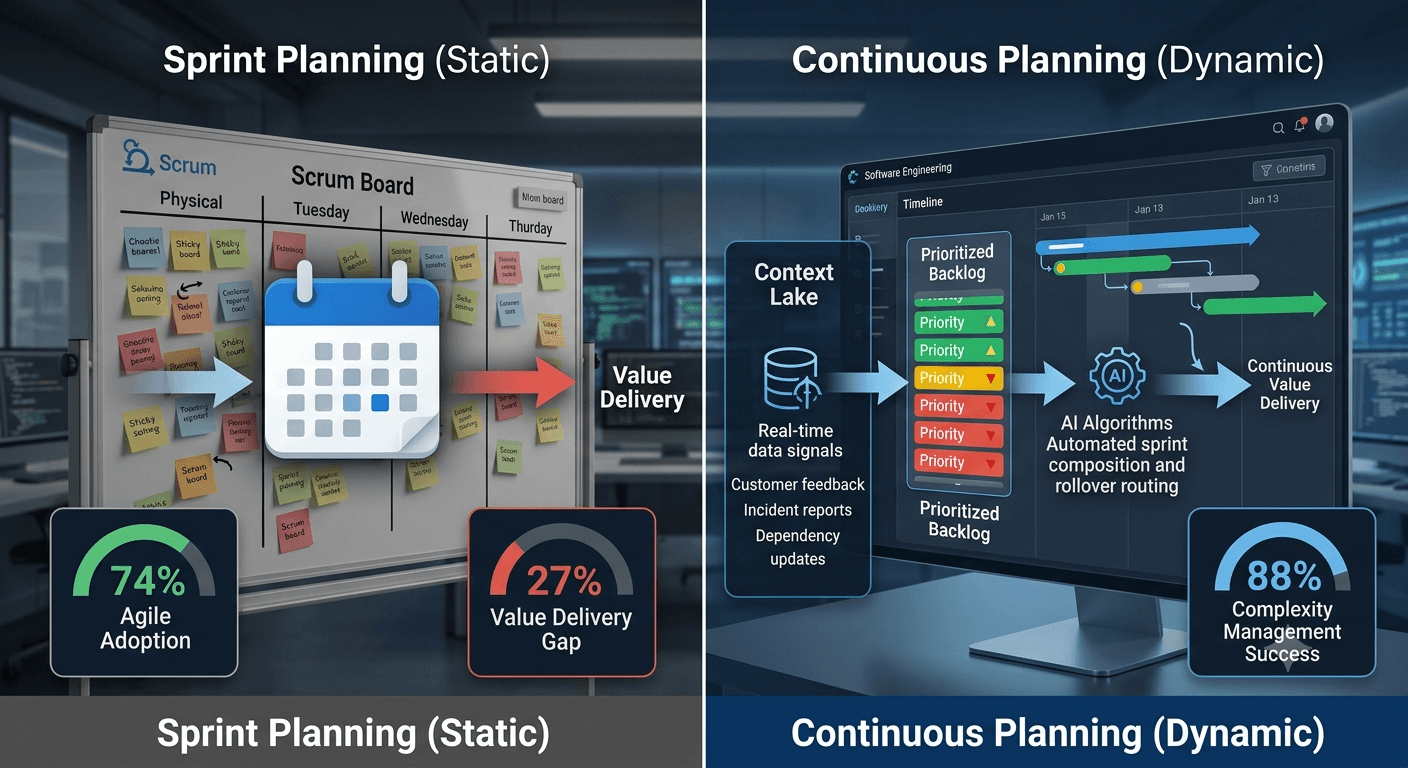
74% of software teams run on Agile. Only 27% say it's actually delivering value (Digital.ai 18th State of Agile Report, 2025). That gap, between adoption and outcomes, is not a training problem, a tooling problem, or a retrospectives problem. It's a planning model problem.
Sprint planning was designed in a world where the cost of change was high and delivery cycles were long. You batched planning into a ceremony every two weeks because that's how long it took to see the results of your last decision. In 2026, that assumption is false for most software teams. Deployment happens daily. Customer feedback arrives in hours. Priority signals change faster than sprint boundaries allow. The plan expires before it ships.
Continuous planning doesn't abandon discipline. It replaces the wrong container, the fixed two-week sprint, with a model that matches how information actually flows in a modern software team.
Key Takeaways
- 74% of organizations run on Agile, but only 27% say Agile is enabling value delivery, the gap is the planning model, not the methodology
- Continuous planning is a team operating model where software decisions are made in response to real-time signals, not ratified once per sprint or quarter
- Teams effective at complexity management achieve 88% project success rates versus 14% for ineffective teams (PMI Pulse 2026)
- The top 14% of teams using AI for planning are 5.6× more likely to plan and prioritize effectively (Atlassian State of Teams 2026)
- Continuous planning doesn't eliminate ceremonies, it makes them a 30-minute review of what AI already drafted, not a 2-hour creation event
What Is Continuous Planning?
Continuous planning is a team operating model where software decisions, what to build next, what to stop, and what to accelerate, are made continuously based on real-time signals, rather than ratified once per sprint or quarter. The backlog is always prioritized. Capacity is always current. The plan updates when information changes, not when the calendar permits.
The distinction matters. Traditional sprint planning creates a snapshot of priorities at a point in time and locks the team to that snapshot for two weeks. Continuous planning treats the plan as a living document: changes propagate immediately, rollover is structural rather than exceptional, and planning itself is distributed across the sprint rather than concentrated in a two-hour ceremony.
Three adjacent concepts get conflated with this all the time, worth separating:
- Continuous delivery is a technical practice, code is always in a releasable state. Continuous planning is upstream from that: it determines what to deliver, not how to ship it.
- Adaptive planning (the PMI/SAFe term) describes planning flexibility at the portfolio or program level. Continuous planning operates at the team level, the individual sprint or cycle.
- Rolling wave planning adds increasing detail as work approaches. Continuous planning goes further, it makes prioritization itself a continuous act, not just specification.
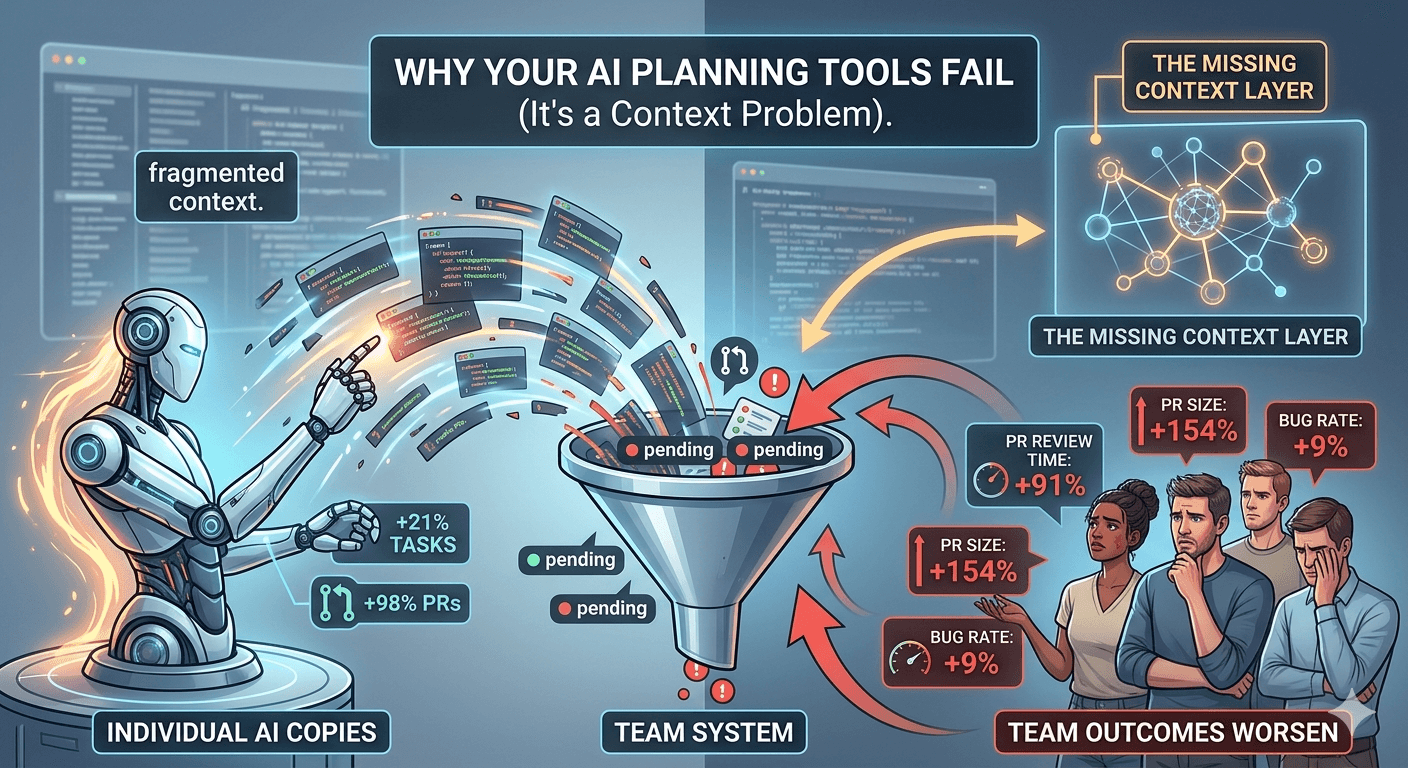
Why AI Planning Tools Fail: The Missing Context Layer
Why Does Standard Agile Planning Break Down?
81% of project professionals say project complexity has increased recently (PMI Pulse of the Profession 2026). Yet the planning model most teams use, a fixed two-week sprint, was designed for low-complexity, high-predictability environments. The mismatch is not subtle.
Here's what breaks first when sprint-based planning meets a complex software environment:
The information gap. Sprint planning produces a plan based on information available at ceremony time. For any sprint longer than two days, that information is already partially stale when the meeting ends. A customer interview conducted mid-sprint doesn't update the plan. A production incident consuming two developer-days doesn't update the plan. A dependency slip doesn't update the plan until the next ceremony.
The rollover cascade. 80% of agile teams regularly move incomplete work to the next sprint (Easy Agile State of Team Alignment 2026, n=419 across 5 countries). Rollover is not a planning failure, it's the sprint model doing what it was designed to do when work exceeds capacity. But each rollover compounds: the rolled story gets re-estimated, re-prioritized, and re-discussed. Four in five teams pay planning costs on the same work twice.
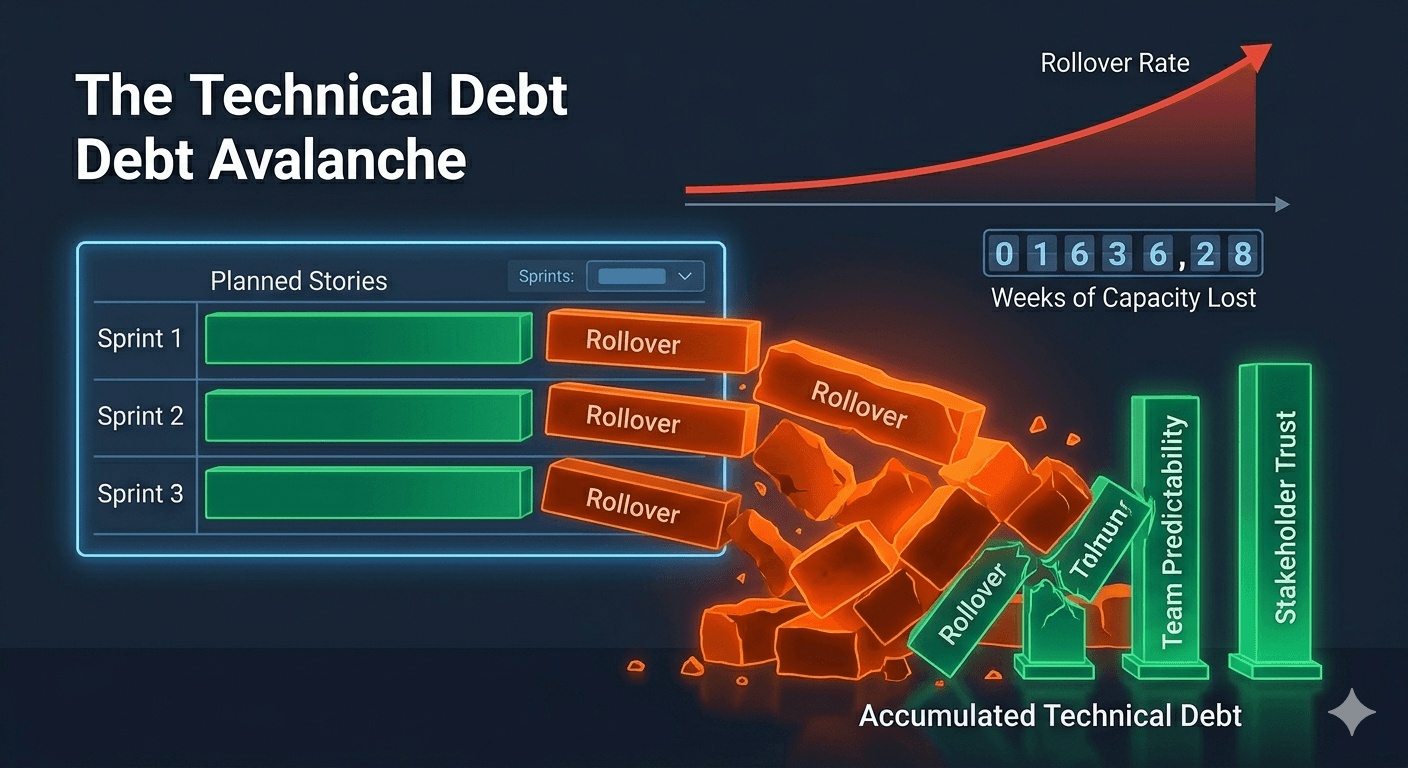
Why 80% of Agile Sprints Roll Over (and How to Fix It)
The estimation paradox. 63% of teams feel confident in their estimates. 44% are significantly off at least half the time (Easy Agile, Feb 2026, n=419). Confidence and accuracy diverge because estimation happens at information poverty: teams lack full dependency visibility, actual capacity after PTO and incidents, and technical risk signals for work they haven't started. Continuous planning doesn't fix estimation, it reduces dependence on it.
The 5 Principles of Continuous Planning
These five principles distinguish genuine continuous planning from "we do retrospectives and sometimes adjust the backlog."
1. The backlog is always ready. Every item in the backlog meets a definition of ready before it enters the sprint candidate pool: title, acceptance criteria, rough effort, and owner are set at issue creation, not in a weekly grooming ceremony. AI-native planning platforms handle this as a continuous background process. Teams on legacy stacks can partially replicate it, Jira Intelligence, Linear AI triage, and ClickUp Super Agents each offer triage within their own platform, but none maintain a unified readiness pipeline across the full backlog, especially when context lives in multiple tools.
2. Capacity is real, not assumed. Capacity is calculated from actual availability, confirmed leave, known incidents, and current on-call rotation, not from a theoretical team size multiplied by sprint days. This requires connecting to HR, calendaring, and rotation systems, not filling out a spreadsheet at sprint start.
3. Priority updates when information changes. New customer interview data, a production incident report, a competitive development, any of these can trigger a re-prioritization event. In continuous planning, re-prioritization is a normal operation, not an emergency override of the sprint commitment.
4. Rollover is structural, not exceptional. In fixed-sprint planning, rollover is a failure. In continuous planning, work that doesn't complete in a cycle flows forward automatically by priority tier. High-priority items carry forward; low-priority items return to the backlog for re-evaluation, with zero team action required. This is one of the clearest markers of an AI-native planning platform: rollover routing should be a system behaviour, not a ceremony. Some tools have started to add partial support (Linear's Cycle Autopilot, launched March 2026, covers a subset of priority tiers), but full automated routing across all priority levels is the complete implementation.
5. Planning is a review, not a creation event. The two-hour planning ceremony becomes a 30-minute review of what the system has already drafted: a sprint composition based on current capacity and backlog priority. The team reviews, adjusts for context the AI doesn't have, and ships. Story creation, sprint composition, and capacity calculation are automated ahead of the meeting.
How Does Continuous Planning Compare to Sprint Planning?
The comparison isn't "no structure" versus "rigid structure." Both impose structure. The question is whether that structure matches how complex software work actually flows.
| Dimension | Sprint Planning | Continuous Planning |
|---|---|---|
| Planning cadence | Fixed (every 2 weeks) | Event-driven (when priorities change) |
| Backlog state | Groomed in periodic ceremonies | Always ready (AI-maintained) |
| Capacity model | Estimated at sprint start | Real-time, from actual availability data |
| Rollover handling | Manual re-prioritization each sprint | Automated by priority tier |
| Mid-sprint changes | Treated as exceptions | First-class, incorporated continuously |
| Planning ceremony time | 1 to 2 hours per sprint | 20 to 30 minutes review |
| Dependencies | Tracked manually, updated inconsistently | Mapped and surfaced automatically |
| AI readiness | Low, planning uses stale context | High, planning reads a live Context Lake |
The practical difference surfaces when a priority changes mid-sprint. In sprint planning, a mid-sprint change is an emergency: it breaks the commitment, requires a stakeholder conversation, and generates overhead. In continuous planning, a mid-sprint priority update triggers an automatic re-sort, the new item moves up, a lower-priority item returns to the backlog, and the team sees the update at their next check-in. No ceremony required.
How Do You Implement Continuous Planning for Your Team?
Only 29% of knowledge workers have embedded AI into their actual workflows, despite 85% using AI at work (Atlassian State of Teams 2026, n=12,035). Most teams add AI tools without changing the underlying planning model. Continuous planning requires changing both. Here's the sequence that works.
Step 1: Audit Your Current Planning Cost
Track hours for one full sprint: the planning ceremony, pre-planning grooming, and the first three days of reactive replanning. Most teams discover they're spending 8 to 12 hours per engineer per sprint on planning mechanics alone. That's the baseline you're optimizing against, and the number that justifies changing the model.
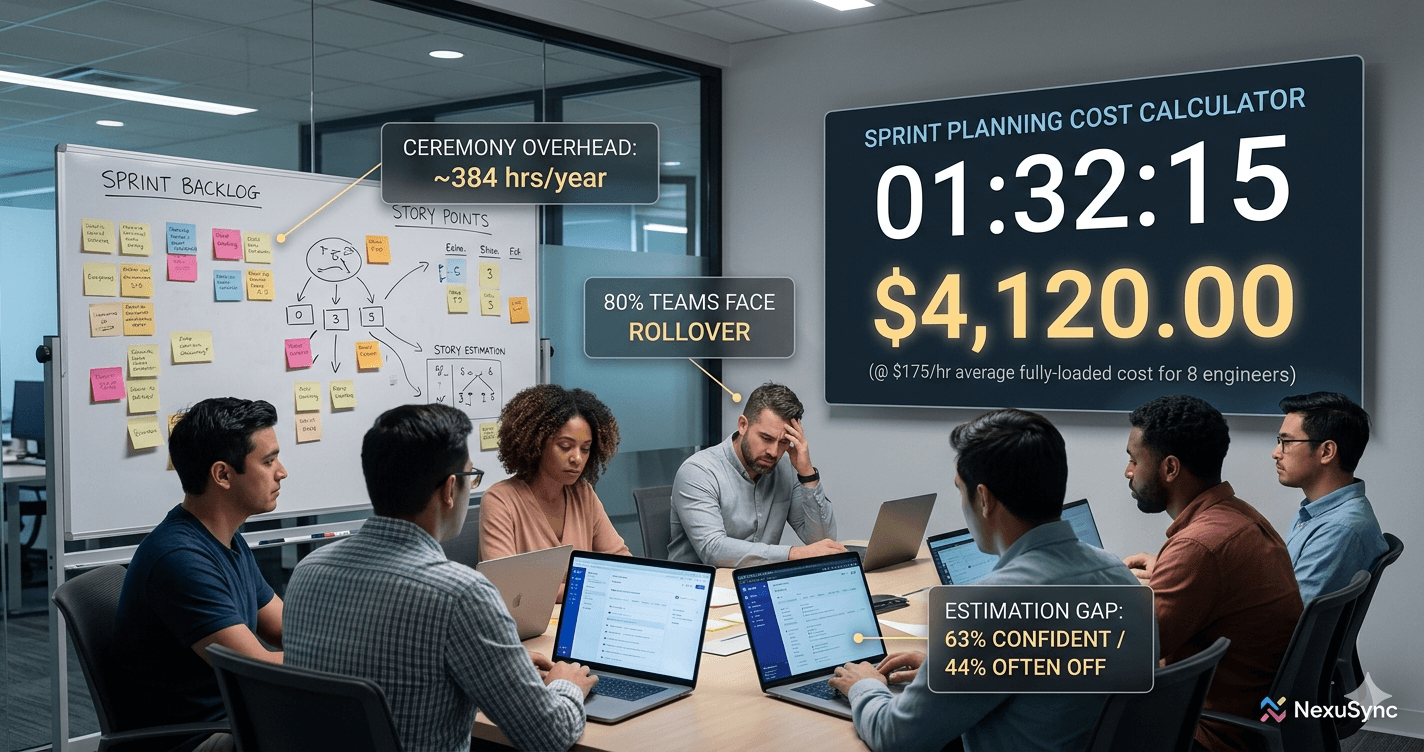
How to Cut Sprint Planning Overhead (And Recover $57K/Year)
Step 2: Implement Definition of Ready
Before any backlog item can enter sprint selection, it must have: a clear title, acceptance criteria, rough effort estimate, priority tier, and owner. This moves story creation out of the planning meeting and into a continuous, async flow. Story creation becomes an individual act. Planning becomes a review.
Step 3: Connect Your Context Sources
Continuous planning is only as good as the context feeding it. Connect your sprint tool to: your PR history (for velocity calibration), your retrospective archive (for risk signals), your team calendar (for actual capacity), and your OKR tracker (for priority alignment). This is what a Context Lake does, it ingests these sources and makes them available to your planning system simultaneously.

What Is a Context Lake? The AI-Native Planning Memory Layer
Step 4: Configure Automated Sprint Composition
Use velocity-based sprint fill to auto-populate the sprint from the top of the prioritized backlog. AI-native planning platforms do this directly from your Context Lake, weaving in live dependency data, actual capacity, and historical velocity in a single step. If you're staying within your current toolset, Zenhub's Automated Sprints, Jira's Sprint Planning Assistant, and ClickUp's automation rules each offer partial fill, though they operate on backlog state alone, without dependency or context signals. Set your fill target at 85% of average velocity, teams planning at 85% capacity achieve significantly higher sprint completion rates than those planning at 100%. The first AI-composed sprint will feel wrong. Run two sprints before adjusting.
Step 5: Configure Rollover Rules
Establish explicit rollover rules by priority tier: P0/P1 items carry forward automatically; P2/P3 items get flagged for a 5-minute triage; P4 items return to the backlog with no ceremony. This one change eliminates 60 to 70% of the conversation in your next planning meeting, which is currently dominated by "what do we do with the things that didn't finish?"
Step 6: Replace Ceremonies with Checkpoints
The daily standup becomes an async written update consumed by the team. The planning ceremony becomes a 30-minute review of the AI-drafted sprint. The retrospective becomes a structured data review: completion rate, rollover %, estimation variance. Retro action items become backlog issues, not promises made once and forgotten.

Which Metrics Tell You If Continuous Planning Is Working?
Teams highly effective at managing complexity achieve an 88% project success rate. Teams that are ineffective achieve 14% (PMI Pulse of the Profession 2026). The difference is measurement: effective teams track what matters and adjust in real time. Here are the four metrics that matter most for continuous planning.
Sprint completion rate. Percentage of committed scope that ships in the cycle. Target: 85%+. If you're below 70%, your capacity model is wrong, not your team. Fix the capacity input before adjusting anything else.
Rollover rate. Percentage of sprint work that carries into the next cycle. Baseline: 80% of teams carry regular rollover. Target after 6 sprints: below 20%. Rollover rate reduction is the clearest leading signal that continuous planning is working.
Estimation variance. The delta between estimated and actual effort, expressed as a percentage. Target: variance below 30% on 75% of issues. This improves as historical velocity data accumulates in the Context Lake, estimates become calibrated, not intuited. It should improve automatically over time without manual recalibration.
Planning ceremony time. Total hours per sprint on planning: preparation, ceremony, and first-48-hour reactive replanning. Target: under 2 hours total for a 6-person team. If ceremony time isn't dropping, the process hasn't actually changed, only the label.

Automate Sprint Planning: A Step-by-Step Guide for 2026
Continuous Planning Objections, Answered
"We'll lose sprint commitments." Sprint commitments create accountability, and continuous planning doesn't eliminate them. It makes them more accurate. When your sprint is composed from a live, capacity-aware backlog rather than a two-hour estimation session, the commitment reflects what your team can actually deliver, not what seemed reasonable on Monday morning.
"Stakeholders need predictability." Predictability comes from reliable delivery, not from committing to fixed scope two weeks in advance. Continuous planning produces a live roadmap that stakeholders can query at any time: "what's in the current cycle?" and "what's coming next?" replace the static sprint commitment document. The answers are always current.
"Our Jira or Linear setup won't support this." Most modern issue trackers support the mechanics of continuous planning: automatic rollover rules, velocity-based sprint fill, real-time priority sorting. The tooling exists. The process change is the bottleneck, not the software.
"We're already agile, this is what we do." If your sprint work never rolls over and your team's estimates are consistently accurate, you've achieved something 80% of teams haven't. If rollover is normal and estimates regularly miss, the planning model is the problem, not the team. Continuous planning is specifically designed for the 80%.
Frequently Asked Questions
What is continuous planning in software development?
Continuous planning is a team operating model where software decisions are made in response to real-time signals, new customer data, changed priorities, capacity shifts, rather than ratified once per sprint or quarter. The backlog is always ready. The sprint is always composed from current priorities. Planning is a review event, not a creation event.
How is continuous planning different from sprint planning?
Sprint planning is a ceremony that produces a fixed plan for a fixed time horizon. Continuous planning replaces the fixed horizon with a rolling one: the team always has a current sprint plan, always has a prioritized backlog, and always can see what comes next. The difference is not ceremony versus no ceremony, it's a static plan versus a living document.
Can continuous planning work alongside Scrum or Jira?
Yes. Continuous planning is a methodology, not a tool mandate. Scrum teams can implement it by changing how they groom, compose, and roll over sprint work. Jira provides a partial starting point, sprint automation rules and velocity tracking let you move some manual work to automation, but genuine continuous planning goes beyond what any issue tracker supports natively. Event-driven priority updates, Context Lake-powered sprint composition, and automated rollover routing require an AI-native planning layer on top of your existing tools. Existing ceremonies can remain, their content and duration change fundamentally.
What infrastructure does continuous planning require?
Continuous planning requires three things: a definition-of-ready backlog (AI-maintained or human-maintained), actual capacity data (real leave, incidents, and rotation, not estimates), and an automated rollover rule set by priority tier. A Context Lake, a centralized, AI-readable repository of your engineering history, is the infrastructure layer that keeps all three continuously accurate.
How long does it take to transition to continuous planning?
Most teams reach a working continuous planning state in 4 to 6 sprints. Sprint 1 is diagnostic: measure your baseline planning cost, rollover rate, and estimation variance. Sprints 2 to 3 implement the backlog definition of ready and rollover rules. Sprints 4 to 6 add automation and reduce ceremony time. By sprint 7, most teams run planning reviews in under 45 minutes with higher completion rates than they achieved under fixed-sprint planning.
Does continuous planning work for distributed teams?
It works better for distributed teams than fixed-sprint planning does. Continuous planning moves most planning work to async channels: AI-generated sprint drafts, async backlog updates, and written check-ins replace synchronous ceremonies that require scheduling across time zones. The one remaining ceremony, the planning review, fits in a 30-minute slot that's straightforward to coordinate globally.